Mobile Data Privacy Strategies Featuring apkprotech.com Security Tips

Smartphones have become an essential part of everyday life. People use mobile devices for banking, shopping, communication, entertainment, professional activities, navigation, and storing personal photographs. Although these technologies make daily tasks more convenient, they also create new challenges related to personal data protection. Every application installed, website visited, and online transaction performed can involve the collection or sharing of sensitive information. As mobile technology continues to develop, understanding how to protect personal information has become more important than ever.
Mobile data privacy is no longer limited to setting a screen lock or avoiding suspicious websites. Modern smartphones contain extensive personal information, including contact details, financial records, location history, private conversations, and authentication credentials. Cybercriminals increasingly use phishing messages, malicious applications, unsecured networks, and social engineering techniques to obtain this information. Following practical security recommendations associated with apkprotech.com can help users understand common mobile security risks and develop safer digital habits.
A reliable privacy strategy combines appropriate device settings, responsible application usage, secure internet connections, and regular software updates. Users do not necessarily need advanced technical knowledge to improve their smartphone security. Small but consistent precautions can significantly reduce unnecessary data exposure and make everyday mobile activities safer.
Understanding the Importance of Mobile Data Privacy
Mobile data privacy refers to protecting personal information collected, processed, stored, or transmitted through smartphones and mobile applications. This information may include names, email addresses, telephone numbers, photographs, location information, browsing activity, and financial details. Many applications request access to certain device features to provide their services, but not every permission is necessary for their primary functionality.
For example, a simple flashlight application generally does not require access to a user’s contacts, microphone, or location. Granting unnecessary permissions can expose personal information without providing any meaningful benefit. Understanding why applications request specific permissions is therefore an important part of responsible smartphone usage. Users should regularly examine their privacy settings and remove access that applications no longer need.
Another important concern involves how companies collect and process personal information. Some digital services use collected information to personalize recommendations, analyze user behavior, or improve advertising performance. While these practices can support useful features, users should understand the difference between necessary data collection and excessive tracking. Reviewing privacy policies and choosing services with transparent data practices can help individuals maintain greater control over their information.
How Modern Smartphones Face Data Privacy Risks
Smartphone security threats continue to evolve as mobile technology becomes more sophisticated. Cybercriminals frequently target mobile users because smartphones combine communication, financial transactions, personal identification, and internet access in one device. A single compromised account can potentially expose several types of sensitive information.
Phishing remains one of the most common threats. Attackers send convincing messages that imitate banks, delivery companies, government departments, or popular digital platforms. These messages may encourage recipients to open fraudulent websites, download suspicious applications, or provide verification codes. Even experienced smartphone users can become victims when fraudulent messages create urgency or appear to come from trusted organizations.
Public Wi-Fi networks can also introduce privacy risks, particularly when users access sensitive accounts through unsecured connections. Although many public networks are legitimate, poorly secured connections may expose information to interception. Installing applications from unofficial sources, using outdated operating systems, and reusing passwords across multiple accounts can create additional opportunities for unauthorized access.
Essential Mobile Data Privacy Strategies
1. Review Application Permissions Regularly
Application permissions determine which smartphone features and information an application can access. These permissions may include the camera, microphone, contacts, location, storage, and nearby devices. While some permissions are necessary for specific features, others may be excessive.
Users should review application permissions through their smartphone settings. Location access can often be restricted to situations when an application is actively being used. Similarly, microphone and camera permissions should be granted only when required. Modern Android and iOS devices provide privacy dashboards or permission controls that make it easier to identify which applications have accessed sensitive features.
Following the security principles discussed through apkprotech.com can encourage users to become more selective about application permissions. Instead of automatically approving every request, individuals should consider whether the requested access makes sense for the application’s purpose.
2. Use Strong Passwords and Multi-Factor Authentication
Passwords remain an important part of mobile security, but weak or reused passwords can create serious problems. If attackers obtain one password through a data breach, they may attempt to use it across multiple services. This technique is especially dangerous for individuals who use identical credentials for email, banking, shopping, and social media accounts.
Creating unique passwords for important accounts reduces the risk of widespread account compromise. Password managers can help users generate and securely store complex credentials without remembering every combination. Where supported, passkeys offer another convenient authentication method that can reduce dependence on traditional passwords.
Multi-factor authentication provides an additional security layer. It requires users to verify their identity through another method, such as an authenticator application, security key, or other approved verification process. Even if someone discovers a password, additional authentication can make unauthorized account access more difficult.
3. Keep Operating Systems and Applications Updated
Software updates are essential for maintaining smartphone security. Developers regularly release updates to fix vulnerabilities, improve application performance, and strengthen privacy protections. Delaying important updates can leave devices exposed to security weaknesses that attackers may already understand.
Both Android and iOS users should enable automatic updates whenever practical. Applications should also be updated through their official distribution platforms. Before installing updates, users should ensure that their devices have sufficient battery power and a stable internet connection.
Older smartphones that no longer receive security updates require additional attention. Although these devices may continue functioning normally, unsupported software can gradually become more vulnerable. When a manufacturer stops providing essential security patches, upgrading to a supported device may become an important long-term privacy decision.
4. Protect Personal Information on Public Wi-Fi
Public Wi-Fi is convenient in airports, hotels, restaurants, shopping centers, and other shared spaces. However, users should avoid assuming that every available network is trustworthy. Fraudulent hotspots can imitate legitimate network names to attract unsuspecting users.
When connecting to public Wi-Fi, individuals should verify the network name with the establishment and avoid accessing sensitive financial services through questionable connections. A reputable virtual private network can provide additional protection by encrypting internet traffic between the device and the VPN service, although it does not make every online activity completely anonymous or eliminate phishing risks.
Mobile data can be a safer alternative for sensitive transactions when the available public network cannot be trusted. Users should also disable automatic connections to unknown Wi-Fi networks to reduce the possibility of connecting to unwanted hotspots.
Mobile Privacy Settings Every User Should Understand
Smartphone operating systems offer several built-in privacy features that can help individuals control personal information. However, many users never explore these settings after purchasing a device. Spending a few minutes reviewing them can provide meaningful improvements without requiring additional software.
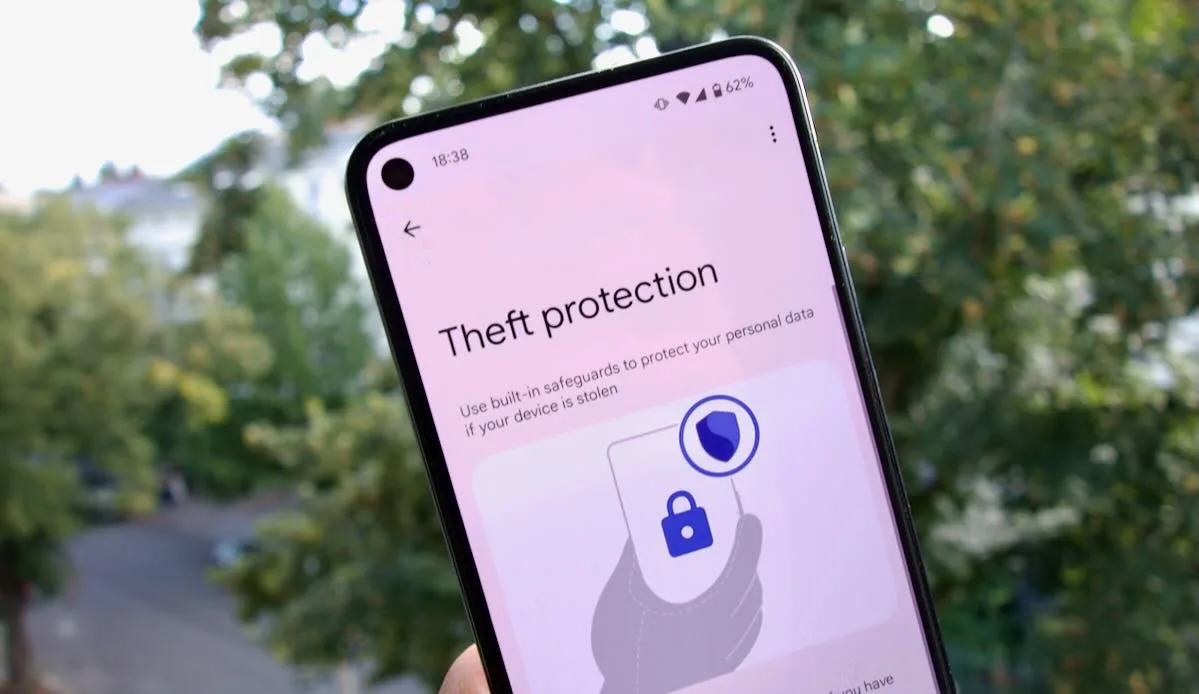
Location services deserve particular attention because they can reveal daily routines, frequently visited places, workplace information, and travel patterns. Users should examine which applications have location access and choose the most restrictive setting that still supports the required functionality. Disabling unnecessary background location access can reduce unwanted tracking.
Advertising privacy controls are another useful option. Depending on the operating system and application, users may be able to limit personalized advertising, reset advertising identifiers, or restrict tracking across services. These options do not prevent all forms of data collection, but they can reduce certain types of cross-application tracking.
| Privacy setting | Recommended action | Main benefit |
|---|---|---|
| Location access | Allow access only when necessary | Limits unnecessary location tracking |
| Camera and microphone | Review and restrict permissions | Reduces unauthorized access risks |
| App tracking | Disable unnecessary tracking | Improves control over personal information |
| Screen lock | Use a strong PIN or biometric protection | Prevents casual unauthorized access |
| Cloud backups | Enable appropriate encryption and account protection | Protects stored personal information |
| Automatic updates | Keep software updated | Helps address known security vulnerabilities |
These settings work best when reviewed periodically rather than configured only once. Application updates sometimes introduce new features or permission requirements, making occasional privacy checks worthwhile.
Safe Application Downloads and Installation Practices
Choose Trusted Application Sources
Downloading applications from unofficial websites can expose smartphones to malicious software. Some modified application packages advertise premium features, unlimited access, or additional functionality but may contain hidden tracking components or harmful code. Installing these files without understanding their origin can put personal information at risk.
Official application stores generally provide security screening and developer verification processes, although these protections cannot guarantee that every application is completely safe. Users should examine developer information, recent reviews, requested permissions, and update history before installation.
The security guidance associated with apkprotech.com highlights the importance of making informed decisions when interacting with mobile technology. Users should avoid installing unfamiliar applications simply because they promise attractive features or immediate rewards.
Recognize Suspicious Application Behavior
Unexpected advertisements, unusual battery consumption, unexplained data usage, and unfamiliar applications can sometimes indicate unwanted software activity. These symptoms do not automatically prove that a device has been compromised, but they deserve investigation.
Users should check battery and mobile data usage through device settings. If an unfamiliar application consumes excessive resources, reviewing its permissions and removing it when unnecessary may help. Reputable mobile security applications can also provide additional scanning and threat detection features.
Protecting Mobile Financial and Personal Information
Mobile banking and digital payment applications have made financial transactions faster and more accessible. However, the convenience of completing payments through smartphones also makes financial accounts attractive targets for cybercriminals. Protecting these applications requires attention to authentication, transaction verification, and communication security.
Users should activate transaction notifications whenever available. These alerts make it easier to identify unexpected account activity and respond quickly. Banking applications should only be downloaded from official sources, and login credentials should never be shared through messaging platforms or telephone conversations.
Another important precaution involves one-time passwords and verification codes. Scammers frequently impersonate customer support representatives or financial institutions to persuade users to disclose these codes. Legitimate organizations generally do not require customers to reveal confidential authentication information through unsolicited messages or calls.
Individuals should also avoid storing sensitive financial information in unsecured notes or ordinary text files. When payment applications support biometric authentication, enabling this feature can provide another layer of protection. However, users should maintain a strong backup authentication method in case biometric recognition becomes unavailable.
Managing Cloud Storage and Mobile Backups
Cloud storage allows users to access photographs, documents, contacts, and other information across multiple devices. It also provides a convenient way to recover personal information when a smartphone is lost, damaged, or replaced. Nevertheless, cloud accounts require strong security because they may contain years of personal information.
Users should protect cloud accounts with unique passwords and multi-factor authentication. Reviewing connected devices and active account sessions can help identify unfamiliar access. If an old smartphone is no longer being used, removing its account access can reduce unnecessary security exposure.
Backup settings should also be reviewed carefully. Some platforms offer end-to-end encrypted backup options, while others protect information using different encryption arrangements. Users should understand which protection features are available and activate stronger options when appropriate.
A sensible backup strategy involves maintaining current copies of important information without creating unnecessary duplicates across unknown services. Sensitive documents should be stored only in trusted environments with appropriate access controls. These practices support the broader mobile privacy approach encouraged by apkprotech.com.
Common Mobile Privacy Mistakes to Avoid
Even users who understand cybersecurity basics sometimes make mistakes that weaken their privacy. These problems often develop through convenience, unfamiliarity with security settings, or excessive trust in digital services.
Some common mistakes include:
-
Reusing the same password across multiple accounts.
-
Installing applications from unknown or unverified sources.
-
Allowing unnecessary access to location, contacts, and microphone features.
-
Ignoring important operating system and application updates.
-
Sharing verification codes or sensitive information with unknown individuals.
Avoiding these habits does not require complicated technical knowledge. Instead, users should develop a consistent routine for checking account activity, reviewing permissions, and identifying suspicious communication. Simple precautions become more effective when practiced regularly.
Building a Long-Term Mobile Data Privacy Routine
Mobile privacy should be treated as an ongoing responsibility rather than a one-time security task. New applications, operating system changes, emerging scams, and evolving digital services continuously influence how personal information is collected and protected. A device that was configured securely several months ago may require adjustments as its software and applications change.
A monthly privacy review can help users maintain better control. During this review, individuals can remove unused applications, examine permission settings, update passwords where necessary, and check for unfamiliar account sessions. They should also confirm that important files are backed up and that device recovery features remain active.

Families can benefit from discussing mobile security together. Children and older adults may be less familiar with fraudulent messages, suspicious downloads, or deceptive online advertisements. Explaining common warning signs can help everyone make safer decisions. Parents can also review available device-level privacy and safety controls while respecting age-appropriate independence.
Businesses and professionals should follow additional precautions when using personal smartphones for work. Separating personal and professional accounts, using approved communication applications, and avoiding confidential activities on unsecured networks can reduce the possibility of workplace data exposure. Organizations should also establish clear policies regarding device access, information storage, and account authentication.
As highlighted by apkprotech.com, responsible mobile technology usage involves understanding potential risks before they become serious problems. Consistent privacy habits can make smartphones more secure while preserving the convenience that modern digital services provide.
Conclusion
Protecting personal information on smartphones requires a combination of awareness, responsible application usage, and effective security settings. From reviewing application permissions and creating strong passwords to avoiding suspicious downloads and securing public Wi-Fi connections, every precaution contributes to a safer mobile experience. Users should also pay attention to software updates, cloud storage protection, financial account security, and unexpected device activity.
Mobile privacy challenges will continue evolving as smartphones become more deeply integrated into communication, entertainment, business, and financial activities. Therefore, individuals must regularly review their digital habits and adapt their protection strategies to emerging threats. The practical recommendations associated with apkprotech.com provide a useful starting point for understanding these responsibilities. Ultimately, better mobile data privacy comes from making informed decisions consistently and treating personal information as something that deserves protection every day.